
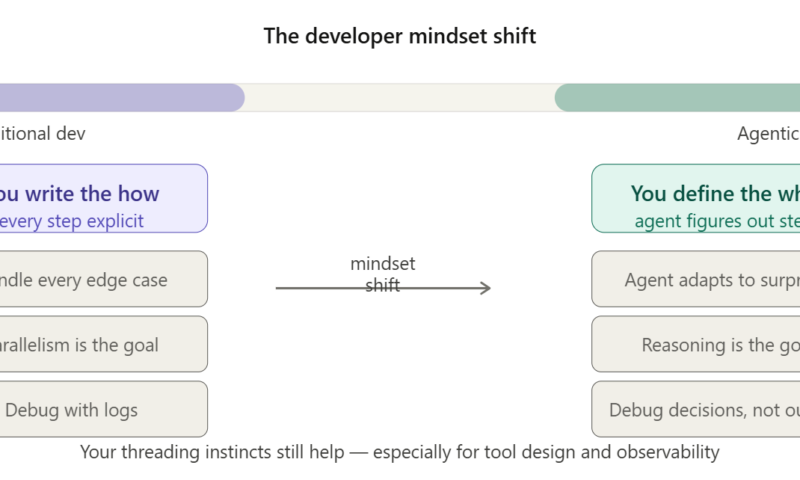
Agentic AI Is Not Just Multi-Threading With a Fancy Hat
A friendly reality check for developers who’ve been there, coded that
If you’ve spent years writing Java or C#, your brain has a beautiful superpower: you see new problems through the lens of patterns you already know. Concurrency, thread pools, executors – these are your comfort zone. So when someone says “AI agents run multiple tasks in parallel”, your brain fires up the old mental model: oh, so it’s like threads. Got it.
Totally understandable. And also, respectfully, kind of wrong. Not completely wrong, but wrong enough that it’ll trip you up when you try to actually build or work with agentic AI systems.
Let’s fix that, with zero jargon and a bunch of real examples.
What Even Is Agentic AI?
Regular AI, like a basic chatbot or a GPT prompt, is reactive. You give it an input, it gives you an output. One shot. Done.
Agentic AI is proactive. You give it a goal, and it figures out the steps, uses tools, makes decisions, and keeps going until the job is done or it hits a wall and asks you for help.
Think of it like this: regular AI is a vending machine. Agentic AI is an intern with a to-do list, a laptop, and access to your company Slack.
Here’s a concrete example. You tell an agent:
“Find all enterprise deals stuck in our CRM for more than 30 days, draft a follow-up email for each, and flag the ones where the last touchpoint was a competitor mention.”
The agent will: hit your CRM API, filter records, pull deal history, analyse notes, draft personalised emails, and return a prioritised list with drafts attached. You didn’t tell it how. You told it what, and it figured out the rest.
The Multi-Threading Trap
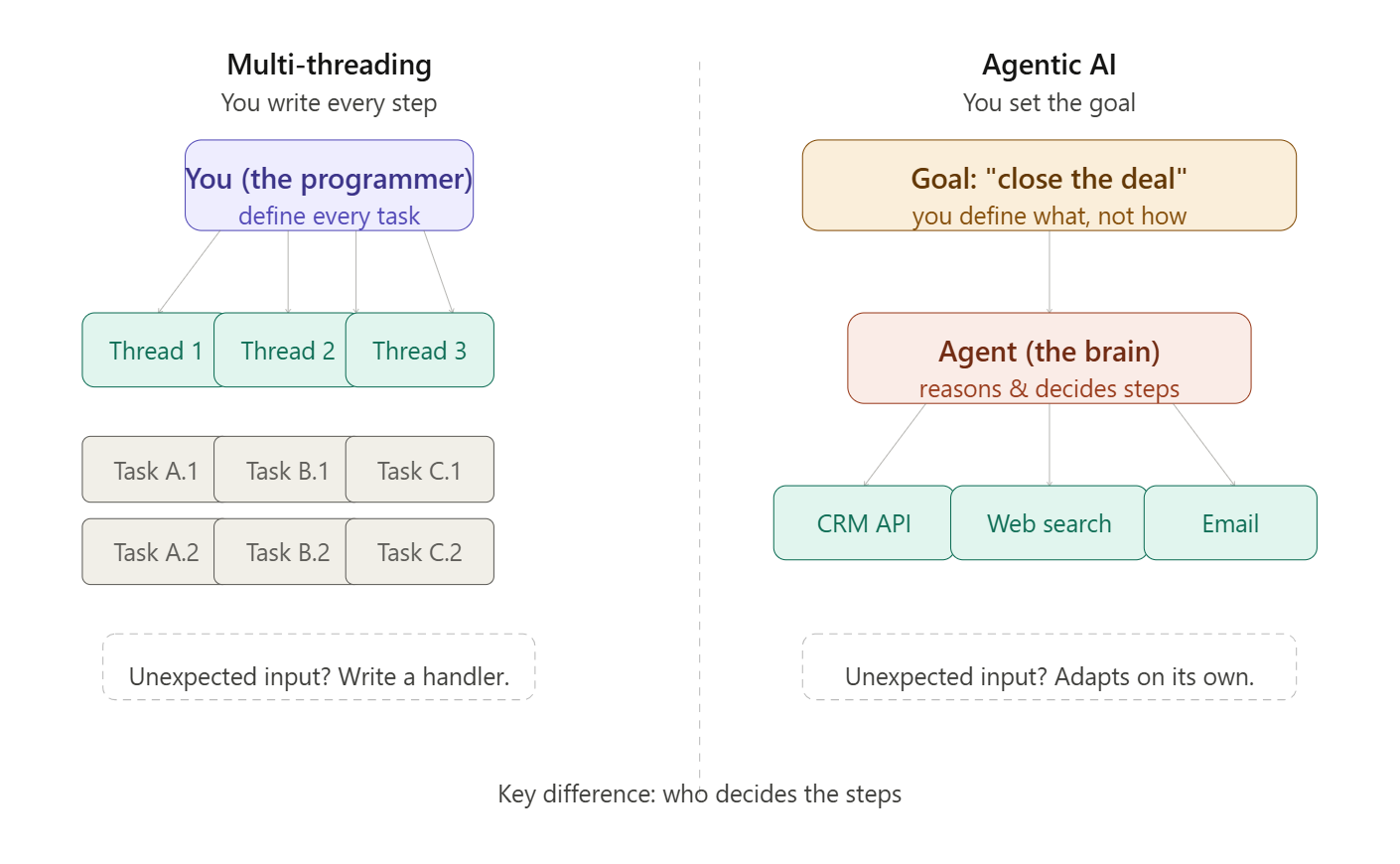
Here’s why the multi-threading analogy feels right at first: agentic systems do sometimes run things in parallel. Multiple agents can work simultaneously: one researching, one writing, one fact-checking. That part looks familiar.
But that’s where the similarity ends. Here’s the full picture:
| Multi-threading | Agentic AI | |
| Who decides the steps? | You (the programmer) | The agent itself |
| Does it run in parallel? | Yes, explicitly | Sometimes, not the point |
| Goal-driven? | No | Yes, core feature |
| Handles surprises? | No, needs coded logic | Yes, adapts dynamically |
| Uses external tools? | No | Yes, APIs, browsers, DBs |
| Can it reason? | No | Yes, that’s the whole game |
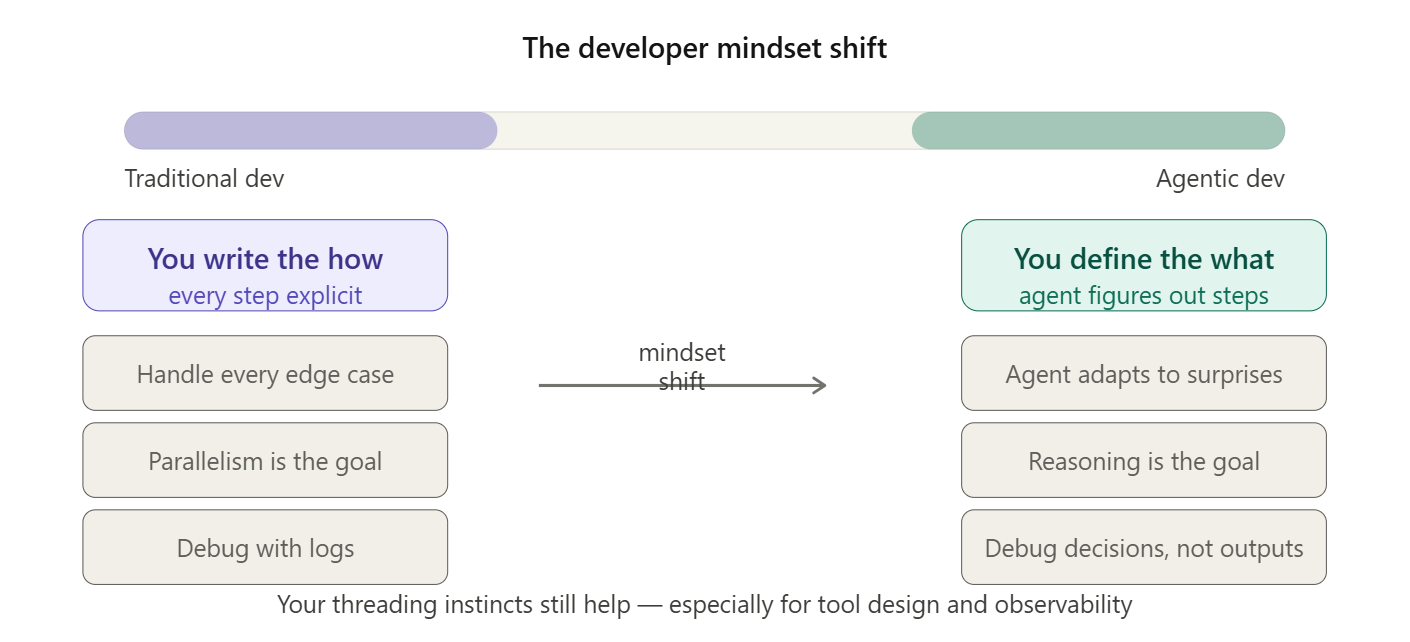
The killer difference? In multi-threading, you’re still the brain. You decide what each thread does. You write every decision point. If something unexpected happens, you have to handle it in code like a try/catch, a fallback, a retry loop. In agentic AI, the agent is the brain. It reads the situation, decides what to do next, and adapts when things go sideways without you writing that logic explicitly.
Real Enterprise Example:
A manufacturing company has an agent connected to SAP, email, and their supplier database. When inventory for a critical component drops below threshold, the agent doesn’t just notify someone, it checks current supplier pricing, compares lead times, drafts a purchase order, and routes it for human approval only if the amount exceeds a set limit.
Multi-threading version: A scheduled job polls inventory levels and triggers a notification. A human logs in, checks prices manually, creates the PO.
Agentic version: The agent handles the entire decision chain. You just approve.
“Okay, But What About Multi-Agent Systems?”
Now you’re asking the right question. When you have multiple agents working together, it does start looking more like multi-threading in structure, at least.
- Agent A pulls and cleans raw data from your data warehouse
- Agent B runs competitive analysis using web search
- Agent C synthesises both into an executive briefing
- All three run concurrently. Results merge at the end.
Sound familiar? It should. But here’s the key: each agent is still reasoning about its task, not just executing pre-written logic. If Agent B hits a paywalled article, it doesn’t crash – it finds an alternative source. If Agent C gets conflicting inputs, it flags the contradiction rather than blindly merging.
The parallelism is real. But the intelligence inside each “thread” is what makes it different.
TL;DR
Multi-threading: you write the what AND the how, then parallelise the execution.
Agentic AI: you write the what, the agent figures out the how, and adapts when reality doesn’t match the plan.

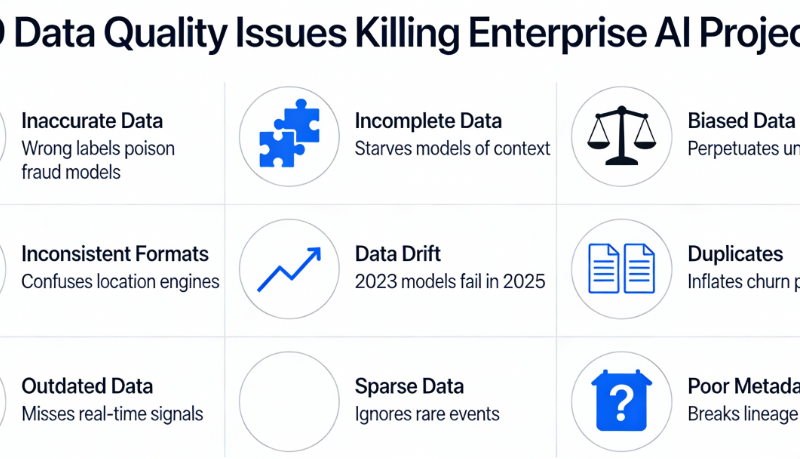
When Bad Data Becomes the Real Enemy: Data Quality Issues That Can Sink Enterprise AI Projects
Enterprise organizations are investing billions in AI, analytics, and automation. But despite advanced AI models, cloud platforms, and state-of-the-art analytics tools, most companies still struggle with one fundamental issue:
Bad data – not bad models – is the #1 reason AI and analytics initiatives fail.
In fact, mislabeled, inconsistent, siloed, or incomplete data can derail projects long before they reach production. Understanding and fixing data quality issues isn’t a side project – it’s the foundation of responsible, reliable, and repeatable AI.
Why Data Quality Matters More Than You Think
You might assume that data problems are just “technical nuisances.” In reality, poor data quality:
- Skews analytics outputs
- Produces biased AI models
- Wastes resources in retraining and debugging
- Creates governance, compliance, and operational risks
- Slows or blocks AI adoption entirely – up to 77% of organizations report data quality issues blocking enterprise AI deployments.
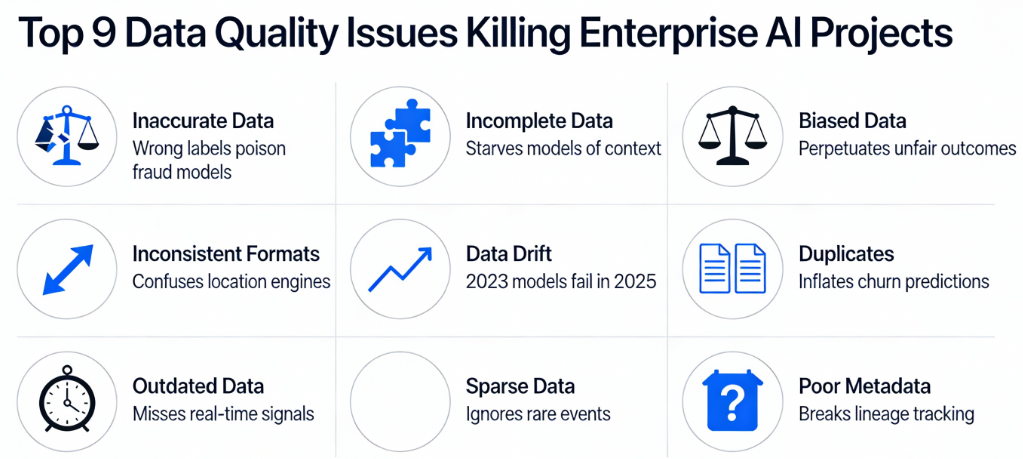
The 9 Most Common Data Quality Issues
These issues are drawn from industry research and practitioner experience and they show why even the most ambitious AI initiatives can go off the rails.
1. Inaccurate, Incomplete, or Improperly Labeled Data
Problem: Models trained on incorrect or missing values will produce flawed outputs – sometimes in subtle and dangerous ways.
Example:
A retail company rolling out demand forecasting found its AI model consistently overestimated sales. The reason? Product attributes were inconsistent across channels, and key stock-keeping units (SKUs) were missing price history. The result: overproduction and increased inventory write-offs.
Lesson:
Before modeling, data must be validated for truthfulness and completeness and not just quantity.
2. Too Much Data (Noise Overload)
Problem: More data isn’t always better. Large datasets may include irrelevant or noisy data that confuses learning algorithms rather than helping them.
Example:
A global bank collected customer transaction data from multiple geographies but failed to filter inconsistencies. Instead of improving credit risk predictions, the model learned patterns from inconsistent labeling standards in different regions, reducing its accuracy.
Lesson:
Curate, filter, and focus your datasets – bigger isn’t always better.
3. Too Little or Unrepresentative Data
Problem: Small or narrow datasets result in models that fail to generalize to real-world scenarios.
Example:
A healthcare analytics initiative to detect rare diseases had plenty of records for common conditions, but only a handful for the target condition. The model overfit to the common classes and failed to detect real cases.
Lesson:
Ensure your training data is representative of the full problem space.
4. Biased & Unbalanced Data
Problem: Models trained on skewed samples inherit bias, leading to unfair or incorrect outputs.
Example:
A hiring tool was trained on historical candidate data which reflected past hiring biases. The AI began to replicate those biases, ranking similar candidates unfairly.
Lesson:
Detect and correct bias early through sampling and fairness audits.
5. Data Silos Across the Organization
Problem: When teams or departments hoard data in separate systems, models lack a unified view of the enterprise context.
Example:
A global insurer with separate regional databases struggled to build a unified AI model. Customer risk profiles differed simply because regional teams measured metrics differently. The result? Inconsistent underwriting decisions and regulatory alarms.
Lesson:
Break silos with enterprise-wide data standardization and governance.
6. Inconsistent Data Across Systems
Problem: Same entities may be represented differently across systems causing mismatches that cascade into analytics errors.
Example:
A multinational consumer packaged goods company found that customer identifiers were inconsistent between CRM, ERP, and sales systems. The result was flawed customer segmentation and misdirected marketing spend.
Lesson:
Establish universal identifiers and shared data dictionaries.
7. Data Sparsity (Missing Values)
Problem: Data sparsity arises when expected values are missing – a common challenge in big enterprise datasets.
Example:
A predictive maintenance model for industrial equipment failed because many sensor values were sporadically missing leading to unreliable predictions and frequent false alarms.
Lesson:
Invest in data completeness checks and fallback imputations.
8. Labeling Issues
Problem: Training data must be correctly tagged or annotated; otherwise, models learn the wrong signals.
Example:
In an AI customer sentiment project, product reviews were labeled incorrectly due to inconsistent annotation standards leading the model to misclassify sentiments by a significant margin.
Lesson:
Rigorous labeling protocols and consensus among annotators improve model reliability.
9. “Too Fast, Too Loose” Integration of Synthetic or Noisy Data
Problem: Using synthetic data without proper controls can amplify noise and bias in models.
Example:
An enterprise used auto-generated customer profiles to augment scarce training data. Instead of improving performance, the model learned artificial patterns that didn’t exist in real behavior reducing real-world accuracy.
Lesson:
Balance synthetic data with real, high‐fidelity datasets.
Enterprise Impact: It’s Not Just About Models; It’s About Business Outcomes
Poor data quality isn’t just a data team problem – it has real business costs and strategic implications:
Financial Losses and Failed Projects
- Organizations with poor data quality spend millions each year remediating data and fixing failed AI initiatives.
Competitive Disadvantage
Teams with reliable, governed data outperform competitors by:
- Faster AI deployments
- Better customer insights
- Higher operational efficiency
Regulatory and Compliance Risks
In industries like finance and healthcare, data quality issues can lead to misreporting and legal penalties.
Best Practices to Mitigate Data Quality Risks
- Early Profiling and Quality Checks
Start with data profiling before modeling begins. - Centralized Governance
Break silos with strong governance, shared definitions, and quality standards. - Automated Validation in Pipelines
Use validation tools and anomaly detection in ETL pipelines. - Bias and Fairness Audits
Regularly test models for skew and bias. - Continuous Monitoring Post-Deployment
Data drift can make even previously high-quality data degrade over time – monitor and retrain as necessary.
Data Quality Is Business Quality
Investments in AI and analytics are only as effective as the data that feeds them. High-quality data enhances trust, scalability, and business outcomes. Poor quality data, on the other hand, drains resources, undermines confidence, and derails innovation.
In the modern enterprise, data quality isn’t a technical challenge – it’s a strategic imperative.
Sankey Diagrams Explained: How Global Companies Use Flow Visuals to Tell Powerful Business Stories
Annual reports are packed with numbers but the smartest companies know that how you visualize those numbers often matters more than the numbers themselves.
One visualization that quietly delivers disproportionate insight is the Sankey diagram.
From energy flows to revenue allocation, carbon emissions to cash movement, Sankey diagrams help executives and analysts answer one deceptively simple question:
“Where is everything really going?”
In this article, we’ll break down:
- What a Sankey diagram is (in simple terms)
- How it’s constructed
- Why it’s uniquely powerful
- How global companies use it in annual reports
- What insights you can extract that tables and bar charts simply can’t
What is a Sankey Diagram?
A Sankey diagram is a flow diagram where:
- Nodes represent categories or stages
- Links (flows) represent movement between them
- The width of each flow is proportional to quantity
In other words:
Thicker flow = more volume / value
Unlike traditional charts that show levels, Sankey diagrams show movement and distribution.
Why Sankey Diagrams Are So Powerful
Most charts answer:
- How much?
- How many?
- How did this change over time?
Sankey diagrams answer:
- Where did it come from?
- Where did it go next?
- How much was lost, retained, or transformed along the way?
They are especially effective when:
- Inputs split into many outputs
- Outputs originate from many inputs
- You want to expose inefficiencies, concentration, or leakage
Anatomy of a Sankey Diagram
Let’s break it down:
1. Nodes
These are the stages or entities in the flow.
- Revenue sources
- Cost categories
- Energy types
- Regions
- Business units
2. Flows (Links)
- Connect one node to another
- Width is proportional to value (money, energy, emissions, users, etc.)
3. Conservation Principle
In most Sankey diagrams:
Total input = Total output (after splits)
This makes discrepancies and losses immediately visible.
Example: Revenue & Profit Flow – NVIDIA (Annual Report Perspective)
Use case: Revenue generation → business segments → cost allocation → operating profit
Typical Sankey Structure
Inputs (Revenue Sources)
- Gaming
- Data Center
- Professional Visualization
- Automotive
- OEM & Other
Transformation (Value Creation & Cost Absorption)
- Compute & Networking platforms
- Graphics & GPU platforms
- AI software & ecosystem investments
- R&D expenditure
- Manufacturing & supply chain costs
- Sales, marketing & administrative overheads
Outputs (Financial Outcomes)
- Cost of Revenue
- Operating Expenses
- Operating Income (Profit)
- Reinvestment into R&D
Key Insights
- Data Center flows dominate profit output, not just revenue input.
- Gaming contributes stable inflow but proportionally less to profit growth.
- R&D absorbs a thick, consistent flow across all revenue streams, signaling long-term moat building.
- Automotive and OEM flows remain thin, reflecting optionality rather than current scale.
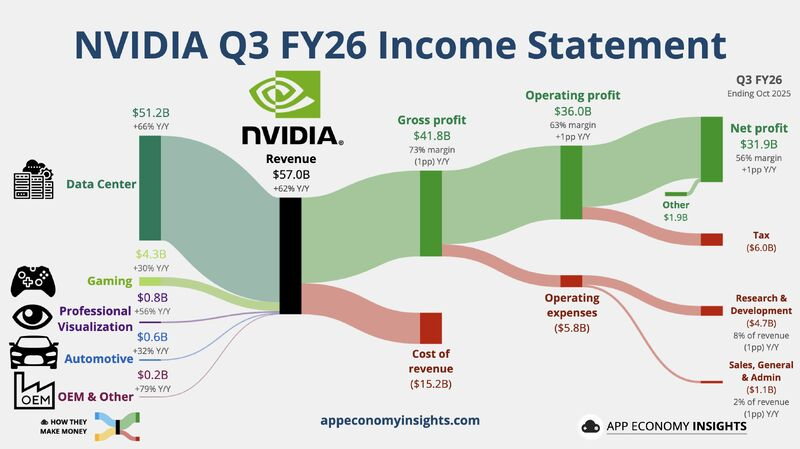
Similarly, a few more examples for references –
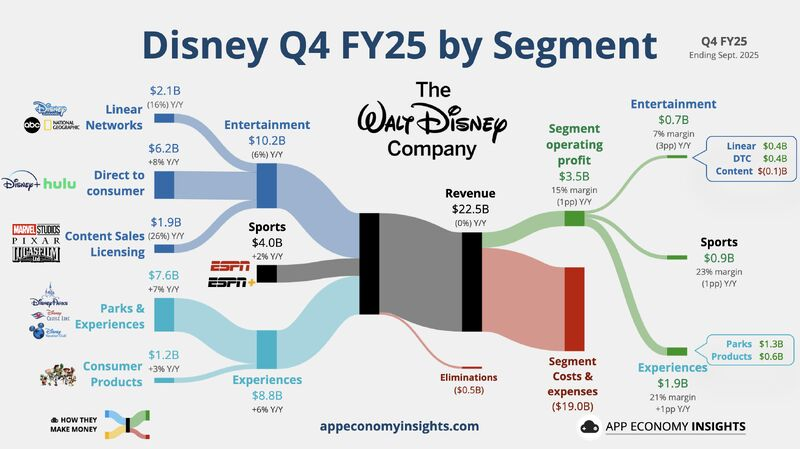
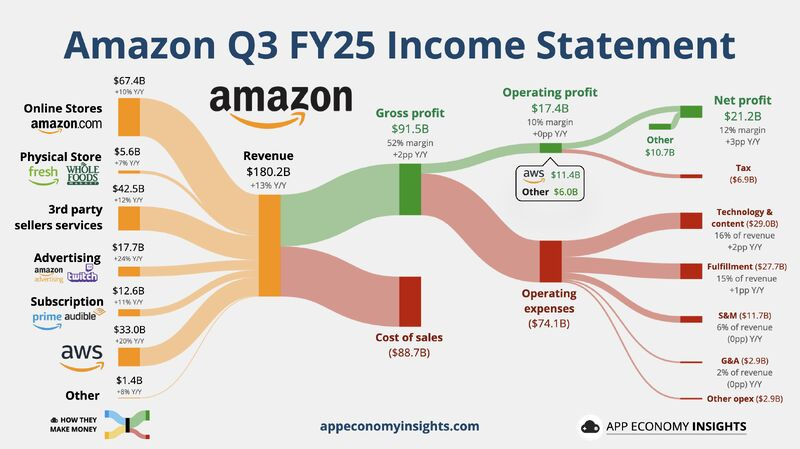
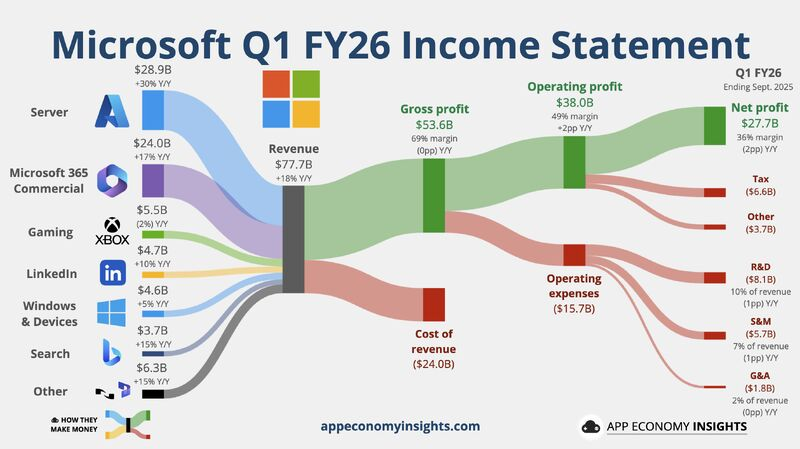
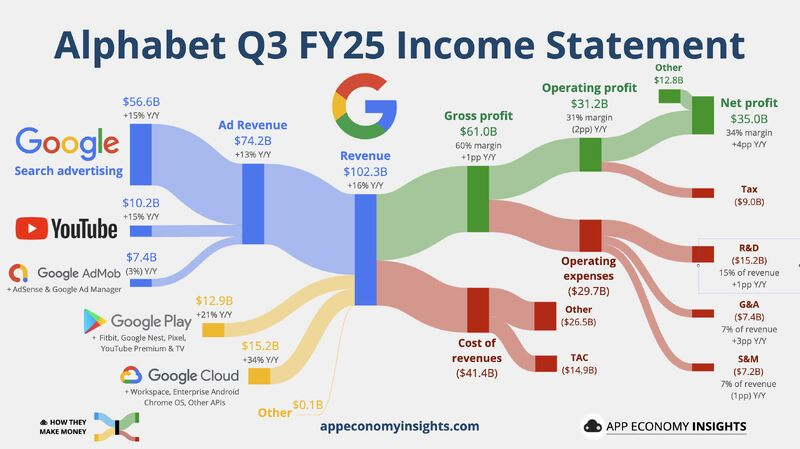
Images credit: App Economy Insights
Sankey diagrams don’t just visualize data – they reveal truth through flow.
They help organizations move from:
- Static reporting → dynamic understanding
- Siloed metrics → system-level thinking
- “What happened?” → “Where should we intervene?”
In a world drowning in dashboards, the Sankey diagram remains one of the most honest ways to show how value actually moves through a business.
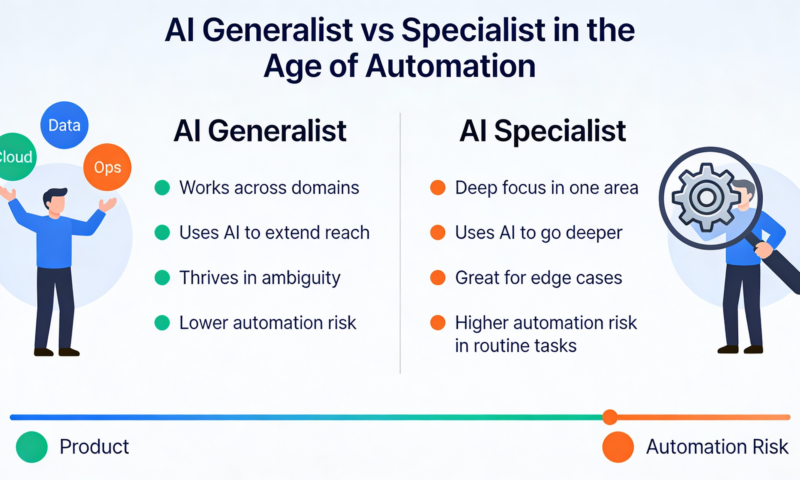
AI Generalist vs Specialist: Who Wins in the Age of AI?
The world of work is undergoing a profound transformation. For decades, the traditional wisdom was clear: specialists build deep expertise, and generalists provide broad context.
Specialists earned higher pay, commanded niche roles, and organizations organized work around clearly defined roles. But as AI reshapes how knowledge is created, applied, and scaled, that old model is being challenged.
In today’s AI-driven landscape, versatility and adaptability increasingly matter as much as deep technical depth. The million-dollar question is:
In the AI era, which matters more – deep specialization or broad generalization?
And more importantly, how should individuals and organizations think about skills, roles, and hiring?
From Slow Change to Rapid Reinvention
Before AI became mainstream, technology evolved slowly.
Specialists such as system architects, database experts, front-end developers could build deep domain knowledge and rely on that expertise to drive predictable outcomes. A Java expert in 2010 could reliably deliver high-performance backend systems because the technology stack was stable for years.
But AI fundamentally changed that dynamic.
AI technologies evolve in months, not years. New models emerge every quarter. Tools that automate deep learning pipelines, conjure production-ready code, or help design user workflows now exist – often before anyone is an expert in using them.
This rapid pace means that specialists rarely get the luxury of working in stable environments for long. The problems of today require fluidity to learn, unlearn, re-learn, and integrate multiple domains.
Why AI Favors Generalists
A recent VentureBeat article argues that the age of the pure specialist is waning and that generalists with range, adaptability, and decision-making can thrive in AI environments.
The key reasons cited:
🔹 Speed of Change
New technologies and frameworks emerge so quickly that specialists built for one stable stack struggle to stay current.
🔹 Breadth Over Depth
Problem-solvers who understand multiple layers from product design to data infrastructure to user experience are better equipped to leverage AI tools for real business outcomes.
🔹 End-to-End Ownership
Generalists often take accountability for outcomes, not just tasks, enabling faster decisions with imperfect information – a hallmark of modern AI work.
In essence, the article suggests that AI compresses the cost of knowledge, making it easier for generalists to perform tasks that once demanded highly specialized training. At the same time, it creates a premium on learning agility, adaptability, and cross-functional thinking.
What Makes a Strong Generalist in the AI Era?
Drawing from synthesis across industry thought:
✔ Breadth with Depth: Not shallow breadth, but deep fluency in a couple of domains plus competence in many.
✔ Curiosity & Adaptability: The ability to quickly learn new technologies and integrate them into solutions.
✔ Agency & Ownership: Acting decisively even with incomplete information.
✔ Cross-Disciplinary Thinking: Connecting dots across engineering, business, design, and operations.
Generalists excel not because they know everything, but because they can connect everything.
But Specialists Still Matter – Especially in High-Stakes Domains
While the pendulum may be swinging, specialization still has critical value particularly where precision, domain depth, and contextual understanding are paramount.
In technical domains like:
- Medical AI and imaging
- Financial risk and regulatory compliance
- Security, safety, and ethical AI engineering
specialists often outperform generalists because their deep expertise enables them to make fine-grained judgments and avoid catastrophic errors that a broad but shallow understanding might overlook.
Specialists are also harder to replace with AI alone because many complex domain problems require years of tacit knowledge, situational judgment, and context that AI hasn’t mastered.
AI Isn’t Killing Specialists – It’s Expanding Roles
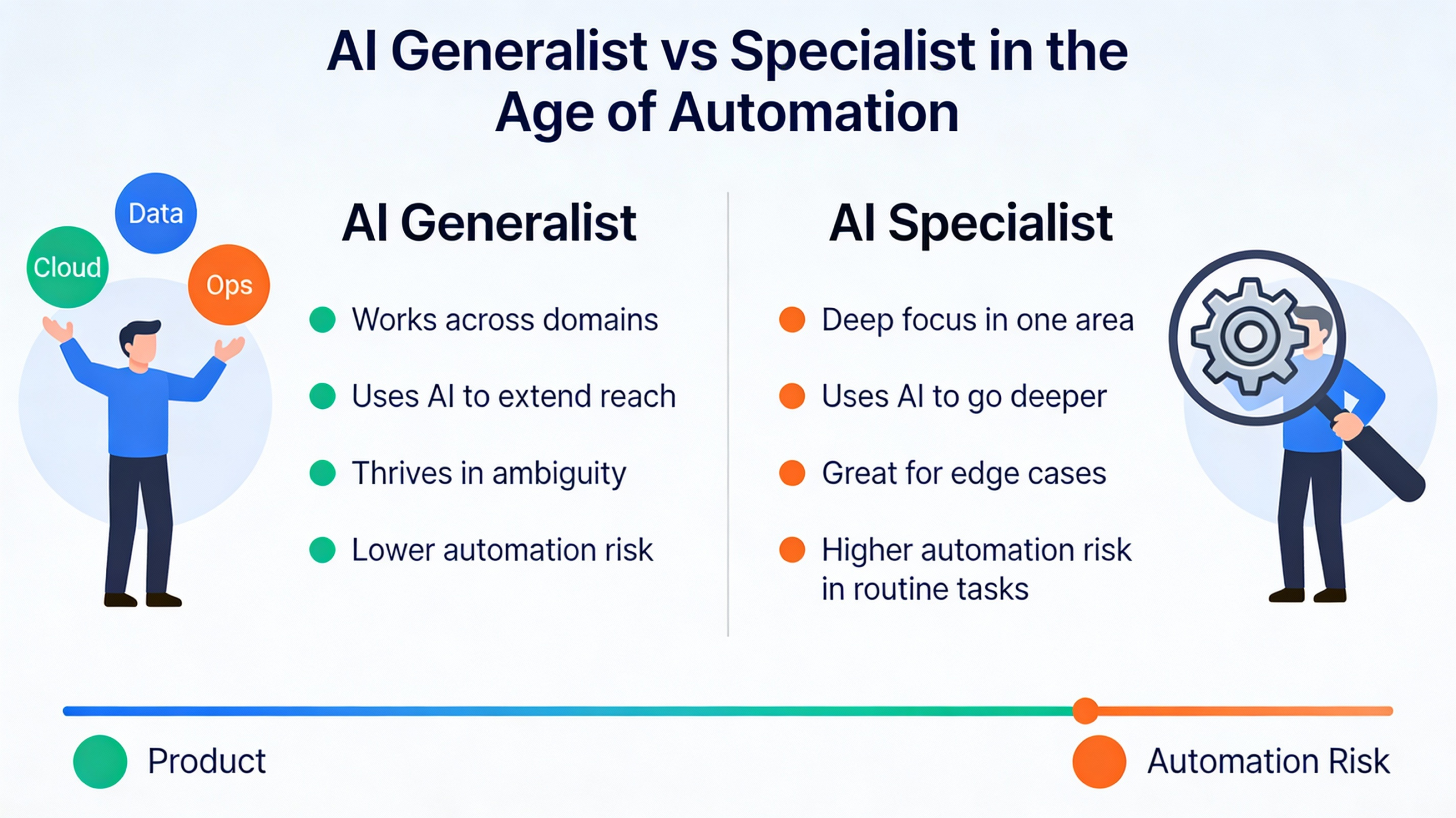
AI lowers the barrier for execution and routine tasks, but it raises the bar for judgment and context. This means:
🔸 Specialists can now leverage AI as a force multiplier – AI handles repetitive and foundational work, while specialists focus on nuance and innovation.
🔸 Generalists can apply AI tools to bridge gaps between domains and lead cross-functional initiatives.
🔸 The true winners are often T-shaped professionals – those with one or two deep competencies and a broad understanding across related areas.
The Balanced Reality: Not Generalists vs Specialists – But How They Work Together
While some voices suggest generalists are the clear winners, the actual landscape is more nuanced.
AI enables:
- Generalists to do more with less (launch prototypes, explore new areas, coordinate teams).
- Specialists to focus on high-value, high-impact tasks that AI cannot fully solve.
The most successful organizations adopt a hybrid talent model:
- Use specialists for deep technical work
- Use generalists to integrate, orchestrate, and guide business impact
A useful way to view this is: AI is making “T-shaped” and “polymath” talent structurally more valuable.
AI doesn’t make specialist knowledge obsolete – it makes specialist knowledge more productive, and generalist judgement more valuable.
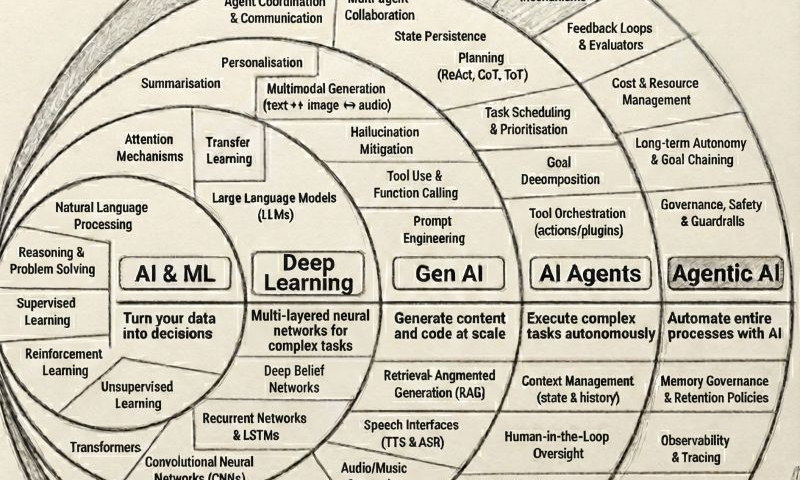
Agentic AI Revolution: From Data-Driven Decisions to Fully Autonomous Enterprises
For more than a decade, organizations have invested heavily in AI – collecting data, building models, and deploying dashboards. Yet despite massive AI adoption, a fundamental gap remains:
AI still waits for humans to act.
The next wave of AI doesn’t just analyze, predict, or generate.
It plans, decides, executes, and optimizes end to end.
This is the rise of Agentic AI.
The Evolution of AI: A Clear Progression
To understand why Agentic AI is transformative, we must view it as a natural evolution, not a sudden breakthrough.
1. AI & ML: Turning Data into Decisions
This is where most enterprises began.
- Predict churn
- Forecast demand
- Optimize pricing
- Detect fraud
Outcome:
Models generate insights → humans take actions.
AI answered “What should we do?”
Humans answered “Okay, now let’s do it.”
2. Deep Learning: Handling Complexity at Scale
Deep learning pushed AI beyond rules and feature engineering.
- Image recognition
- Speech-to-text
- Recommendation engines
- Natural language understanding
Outcome:
AI handled high-dimensional, unstructured data but still stopped short of execution.
3. Generative AI: Creating Content and Code
Generative AI unlocked unprecedented productivity.
- Write content
- Generate code
- Summarize documents
- Assist with reasoning
Outcome:
AI became a co-pilot, accelerating human workflows.
GenAI says: “Here’s the content/code.”
Humans still say: “I’ll decide what to do next.”
4. AI Agents: Executing Multi-Step Tasks
AI Agents introduced goal-oriented behavior.
An AI agent can:
- Break a task into steps
- Call tools and APIs
- Observe outcomes
- Adjust actions dynamically
Example:
A marketing agent that:
- Analyzes campaign performance
- Adjusts budget
- Launches experiments
- Reports results
Outcome:
AI started acting, not just assisting but usually within narrow tasks.
5. Agentic AI: Automating Entire Processes
This is where the real shift happens.
Agentic AI is not a single agent.
It is a system of coordinated AI agents that can:
- Understand business goals
- Design execution plans
- Orchestrate multiple tools, models, and workflows
- Learn from outcomes
- Continuously optimize without human intervention
Agentic AI doesn’t ask “What should I generate?”
It asks “What outcome am I responsible for?”
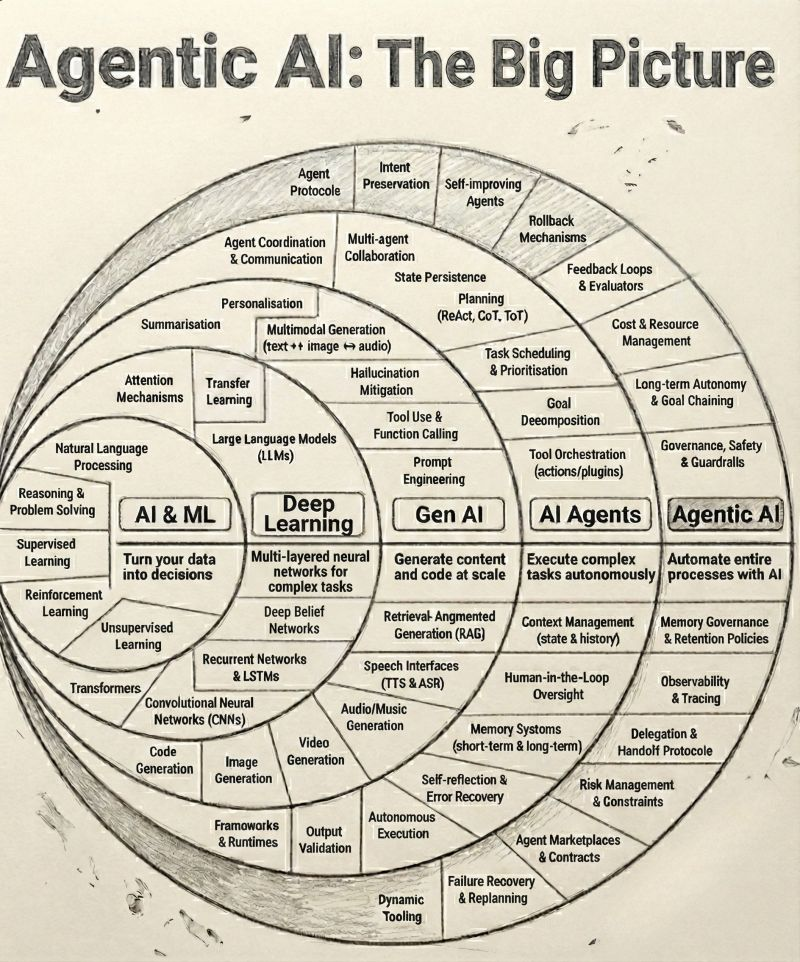
Image credit: https://www.linkedin.com/in/brijpandeyji/
What Makes Agentic AI Fundamentally Different?
| Capability | Traditional AI | GenAI | Agentic AI |
|---|---|---|---|
| Insights | ✅ | ✅ | ✅ |
| Content Generation | ❌ | ✅ | ✅ |
| Tool Usage | ❌ | Limited | ✅ |
| Multi-step Planning | ❌ | ❌ | ✅ |
| Autonomous Execution | ❌ | ❌ | ✅ |
| Outcome Ownership | ❌ | ❌ | ✅ |
Agentic AI owns the full loop:
Goal → Plan → Act → Observe → Improve
How to get ahead of 99% people?
Many people believe that to achieve massive success, they must outwork the entire world.
However, you don’t actually need to beat billions of people; you only need to outwork three specific individuals to get ahead of life, to get rich and, more importantly, to get free.
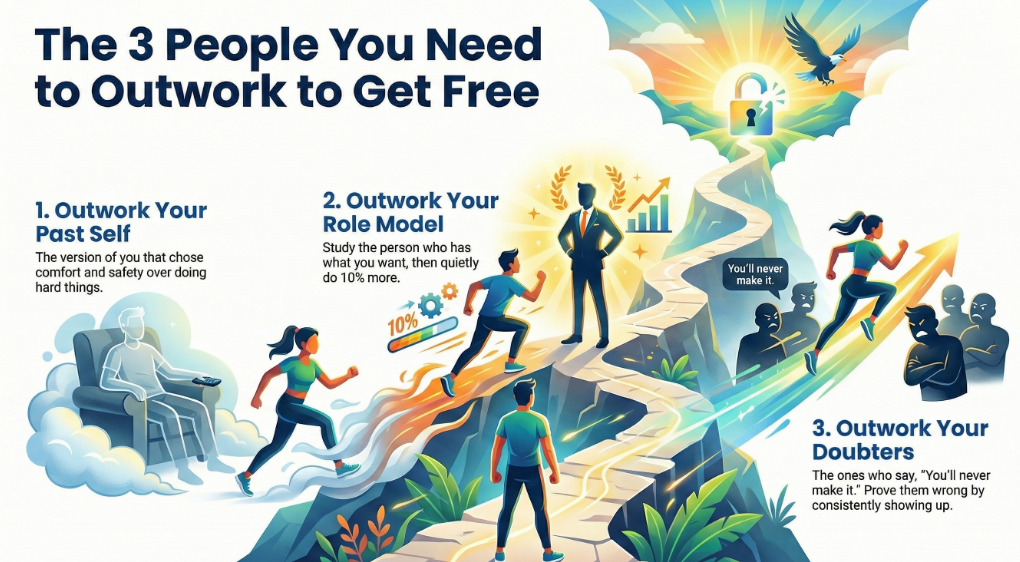
1. The “Past You”
The “Past You” is the version of yourself that prioritized comfort and safety over success. This is the person who looked at a difficult task and decided to do it “later” or stayed in bed because it was warm.
• Real-World Example: Imagine a budding entrepreneur who, for months, avoided the “hard thing” – like cold-calling potential clients or waking up at 5:00 AM to work on their business plan before their day job. To win, they must outwork that past version of themselves by doing those exact difficult tasks today that they put off yesterday.
2. The Person Who Already Has What You Want
Instead of falling into the trap of envy, you should study those who have already achieved your goals. Observe how they think, what they sacrificed to get there, and how they execute their daily tasks.
• Real-World Example: If you are a salesperson aiming to be the top earner in your firm, don’t just watch the current leader with jealousy. Study their routine and then quietly do 10% more. If they make 50 calls a day, you make 55. If they stay until 6:00 PM, you stay until 6:30 PM. Doing one more call, one more rep, or one more late night is the key to eventually surpassing them.
3. The Person Counting on You to Quit
There will always be skeptics – the people who tell you that your idea is “too risky” or that you “aren’t built for this”. You don’t need to waste your energy arguing with them or trying to prove them wrong with words.
• Real-World Example: Think of an athlete whose peers say they’ll never make the varsity team. The athlete doesn’t need to explain their talent; they simply need to keep showing up to every practice and putting in the work until their results become so undeniable that they can no longer be ignored.
The Path to Freedom
If you focus on outworking these three people long enough, you won’t just find get ahead of all those 99% people, you will achieve true freedom.
Success in this journey is like building a stone wall. You aren’t trying to build the whole wall in a day; you are simply focused on laying the next brick better than you did yesterday (outworking “Past You”), laying one more brick than the master mason next to you (outworking the person who has what you want), and continuing to lay bricks even when people say the wall will fall (outworking those counting on you to quit). Eventually, you have a fortress that no one can take away from you.

How to be the Top 1% Learner?
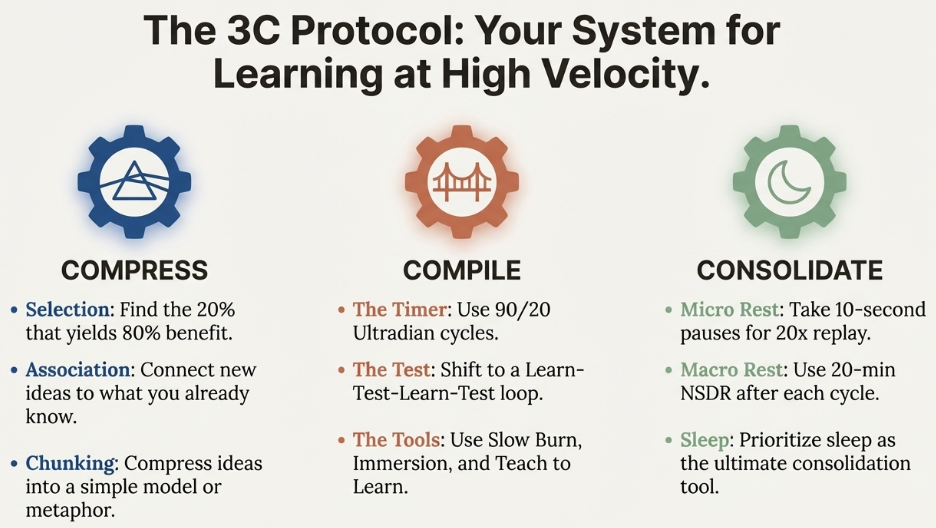
In an age where AI makes intelligence a commodity, your only real competitive edge is how fast you can learn and stay ahead. Most people fail because they try to “jam and cram” information into their prefrontal cortex, which acts like a “tiny cognitive bowl” that can only hold about four independent ideas at once.
To break into the top 1% of learners, you must stop hoarding information and start using the 3C Protocol: Compress, Compile, and Consolidate.
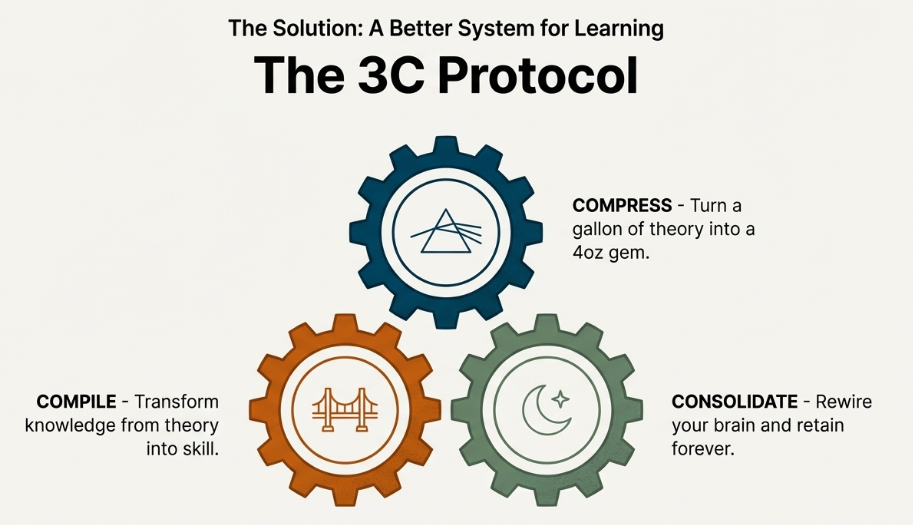
1. Compress: Turn Data into Patterns
The first step is reducing complex theories into small, manageable chunks that your brain can actually carry.
• An Example (Chess): Grandmaster Magnus Carlson doesn’t memorize every possible move; instead, he has internalized up to 100,000 patterns. He wins by associating a new move on the board with an old pattern he already understands.
• Actionable Tip: When reading a book, don’t read every page. Apply the 80/20 rule by selecting the 20% of chapters that provide 80% of the value. Connect these new ideas to something you already know and turn them into a simple drawing or metaphor.
2. Compile: Move from Consumption to Action
Mastery is not about what you can recall, but what you can do. The tragic story of savant Kim Peak – who could recall 12,000 books but struggled with basic daily chores – proves that memory alone is not mastery.
• An Example (The Musician): If you are learning a physical skill like the guitar, use the “Slow Burn” tool. Play at an excruciatingly slow pace while maintaining intense focus on every micro-move. This ensures the brain is actively “compiling” the skill rather than operating on autopilot.
• Actionable Tip: Use 90-minute “ultradian” focus blocks. Instead of waiting months for a final exam, create “agile” learning loops: learn, test, learn, test. You can even “teach to learn” by lecturing to a wall as if you were giving a TED talk to internalize the material.
3. Consolidate: Honor the Rest
Retention doesn’t happen while you are studying; it happens when you stop. Learning is a two-stage process where focus sends the “rewire” request, but rest is where the actual wiring occurs.
• An Example (Farmer): Just as a farmer knows a field must rest to regain its fertility, a learner must manage rest at micro and macro levels.
• Actionable Tip: Within your 90-minute work block, take 10-second micro-breaks. Research shows that during these pauses, your brain replays what you just learned at 10 to 20 times the speed, giving you “free reps” of practice. After your session, practice NSDR (non-sleep deep rest) or Yoga for 20 minutes to let your brain connect information without distractions.
The Mindset Shift
To succeed with the 3C Protocol, you must stop racing others and focus only on beating who you were yesterday. When you are in the middle of a learning session, be the performer, not the critic. If you feel friction, don’t quit – that struggle is the “generation effect” signaling that deep wiring is taking place.
Shift-Left, Shift-Right: The Twin Strategies Powering Modern IT and Data Operations
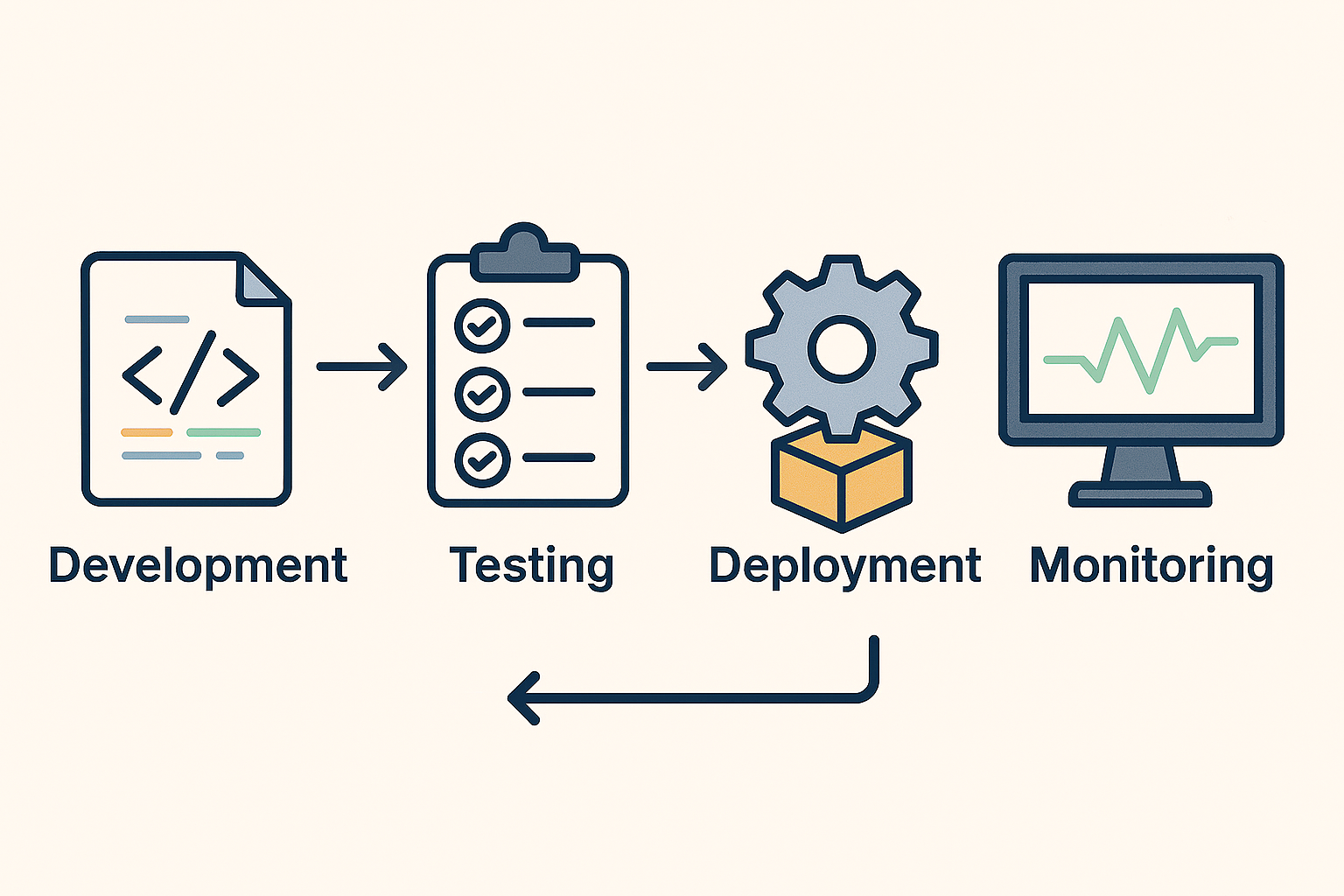
In today’s always-on digital enterprises, downtime and performance issues come at a steep cost. The modern DevOps philosophy has redefined how organizations build, test, deploy, and manage software and data systems. Two terms: Shift-Left and Shift-Right capture this evolution perfectly.
These approaches are not just technical buzzwords; they represent a cultural and operational transformation from reactive troubleshooting to proactive prevention and continuous improvement.
1. What Does “Shift-Left” Mean?
“Shift-Left” is all about moving quality and risk management earlier in the lifecycle, to the “left” of the traditional project timeline.
Historically, teams tested applications or validated data after development. By that stage, identifying and fixing issues became expensive and time-consuming.
Shift-Left reverses that by embedding testing, data validation, and quality assurance right from design and development.
Real-world example:
- Microsoft uses Shift-Left practices by integrating automated unit tests and code analysis in its continuous integration (CI) pipeline. Each new feature or update is tested within minutes of being committed, drastically reducing post-release defects.
- In a data engineering context, companies like Databricks and Snowflake promote Shift-Left Data Quality – validating schema, freshness, and business rules within the pipeline itself before data lands in analytics or AI systems.
Why it matters:
- Reduces defects and rework
- Improves developer productivity
- Speeds up deployment cycles
- Builds confidence in production releases
2. What Does “Shift-Right” Mean?
“Shift-Right” extends testing and validation after deployment, to the “right” of the timeline. It’s about ensuring systems continue to perform and evolve once they’re live in production.
Rather than assuming everything works perfectly after release, Shift-Right emphasizes continuous feedback, monitoring, and learning from real user behavior.
Real-world example:
- Netflix uses Shift-Right principles through its famous Chaos Engineering practice. By intentionally disrupting production systems (e.g., shutting down random servers), it tests the resilience of its streaming platform in real-world conditions.
- Airbnb runs canary deployments and A/B tests to validate new features with a subset of users in production before a global rollout – ensuring a smooth and data-driven experience.
Why it matters:
- Improves reliability and resilience
- Enables real-time performance optimization
- Drives continuous learning from production data
- Enhances customer experience through fast iteration
3. When Shift-Left Meets Shift-Right
In modern enterprises, Shift-Left and Shift-Right are not opposites – they’re complementary halves of a continuous delivery loop.
- Shift-Left ensures things are built right.
- Shift-Right ensures they continue to run right.
Together, they create a closed feedback system where insights from production feedback into design and development creating a self-improving operational model.
Example synergy:
- A global retailer might Shift-Left by embedding automated regression tests in its data pipelines.
- It then Shifts-Right by using AI-based anomaly detection in production dashboards to monitor data drift, freshness, and latency.
- Insights from production failures are looped back into early validation scripts closing the quality loop.
4. The AI & Automation Angle
Today, AI and AIOps (AI for IT Operations) are supercharging both shifts:
- Shift-Left AI: Predictive code scanning, intelligent test generation, and synthetic data generation.
- Shift-Right AI: Real-time anomaly detection, predictive incident management, and self-healing automation.
The result? Enterprises move from manual monitoring to autonomous operations, freeing up teams to focus on innovation instead of firefighting.
The future of enterprise IT and data operations isn’t about reacting to problems – it’s about preventing and learning from them continuously.
“Shift-Left” ensures quality is baked in early; “Shift-Right” ensures reliability is sustained over time.
Together, they represent the heart of a modern DevOps and DataOps culture — a loop of prevention, observation, and evolution.
Canary Deployment Explained: Reducing Production Risk in DevOps with Controlled Releases
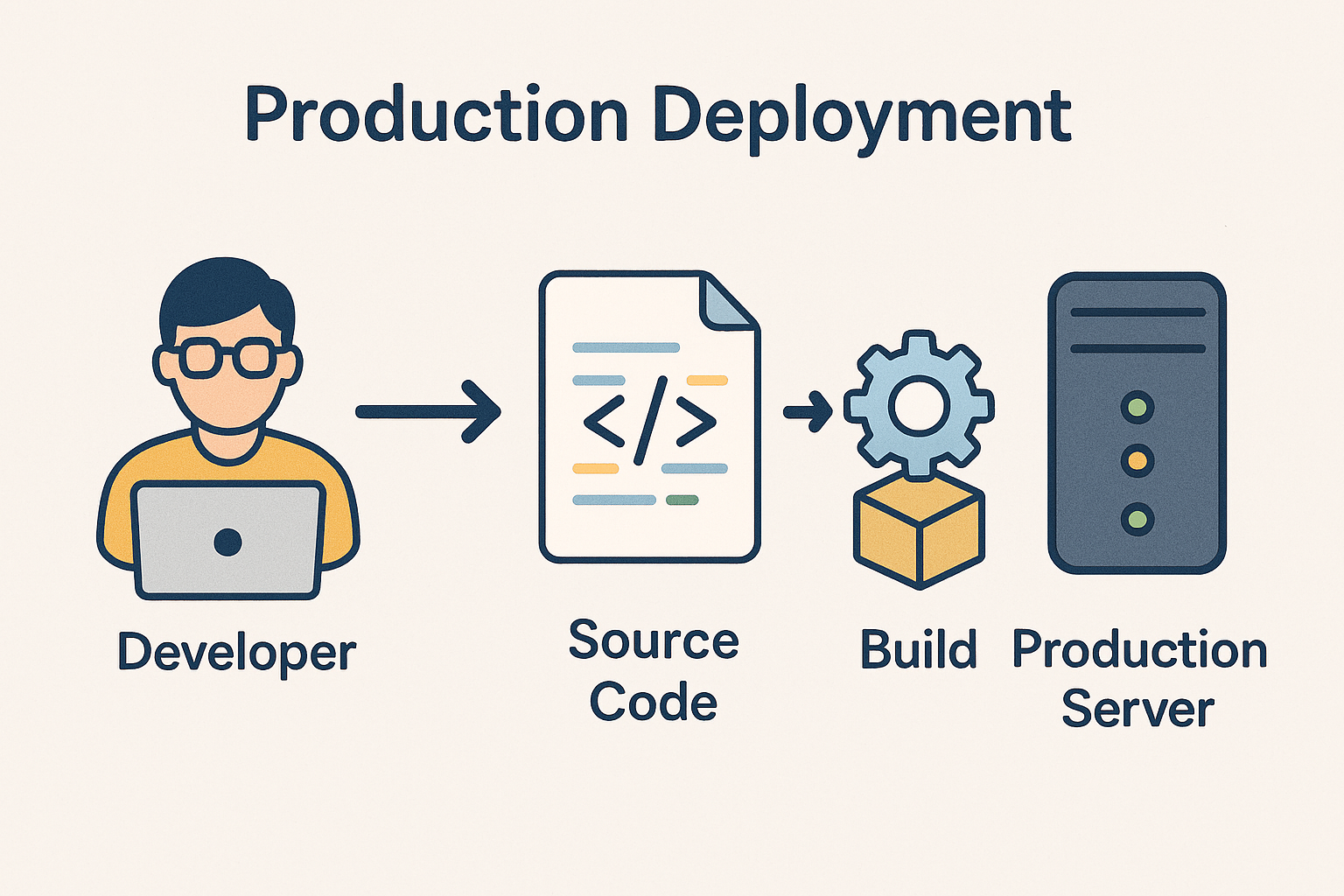
Canary deployment is one of those DevOps terms that sounds abstract but is actually a very clever, real-world technique used by top tech companies like Netflix, Amazon, and Google.
Let’s unpack it in a clear, practical way –
What Is a Canary Deployment?
A canary deployment is a progressive rollout strategy where a new version of an application (or data pipeline, model, etc.) is released to a small subset of users or systems first, before deploying it to everyone.
The goal: Test in the real world, minimize risk, and catch issues early – without impacting all users.
Where the Name Comes From
The term comes from the old “canary in a coal mine” practice.
- Miners used to carry a canary bird underground.
- If dangerous gases were present, the bird would show distress first – warning miners before it was too late.
Similarly, in software deployment:
- The “canary group” gets the new version first.
- If problems occur (e.g., errors, latency spikes, or crashes), the rollout stops or rolls back.
- If all looks good, the new version gradually reaches 100% of users.
How It Works in Practice
Here’s the step-by-step flow:
- Deploy new version (v2) to a small portion of traffic (say 5-10%).
- Monitor key metrics: performance, error rates, user engagement, latency, etc.
- Compare results between the canary version and the stable version (v1).
- If KPIs are healthy, automatically scale up rollout (20%, 50%, 100%).
- If issues arise, rollback instantly to the previous version.
Example Scenarios
1) Web / App Deployment
A global streaming platform like Netflix releases a new recommendation algorithm:
- First, 5% of users in Canada get the new algorithm.
- Netflix monitors playback time, user retention, and error logs.
- If everything looks good, it expands to North America, then globally.
2) Data Pipeline or Analytics System
A retailer introduces a new real-time data ingestion flow:
- It runs in parallel with the old batch flow for one region (the canary).
- Teams compare data accuracy, latency, and system load.
- After validation, the new pipeline fully replaces the old one.
Benefits
| Benefit | Description |
|---|---|
| Reduced Risk | Problems affect only a small user group initially |
| Faster Feedback | Real-world validation of performance & stability |
| Controlled Rollout | Gradual scaling based on metrics |
| Easy Rollback | Quick reversion to the stable version if issues occur |
Challenges
- Requires strong observability and real-time monitoring tools (like Datadog, Prometheus, or Azure Monitor).
- Needs automated rollback scripts and infrastructure-as-code setup.
- Works best in containerized environments (Kubernetes, Docker, etc.) for version control and isolation.
In Summary
Canary deployment = “Release small, observe fast, scale safely.”
It’s a smart middle ground between risky full releases and overly cautious manual rollouts – ensuring continuous innovation with minimal disruption.

Databricks AI/BI: What It Is & Why Enterprises Should Care
In the world of data, modern enterprises wrestle with three big challenges: speed, accuracy, and usability. You want insights fast, you want them reliable, and you want non‐technical people (execs, marketers, operations) to be able to get value without depending constantly on data engineers.
That’s where Databricks AI/BI comes in—a newer offering from Databricks that blends business intelligence with AI so that insights become more accessible, real‐time, and trustworthy.
What is Databricks AI/BI?
Databricks AI/BI is a product suite that combines a low-code / no-code dashboarding environment with a conversational interface powered by AI. Key components include:
- AI/BI Dashboards: Allows users to create interactive dashboards and visualizations, often using drag-and-drop or natural-language prompts. The dashboards integrate with Databricks’ SQL warehouses and the Photon engine for high performance.
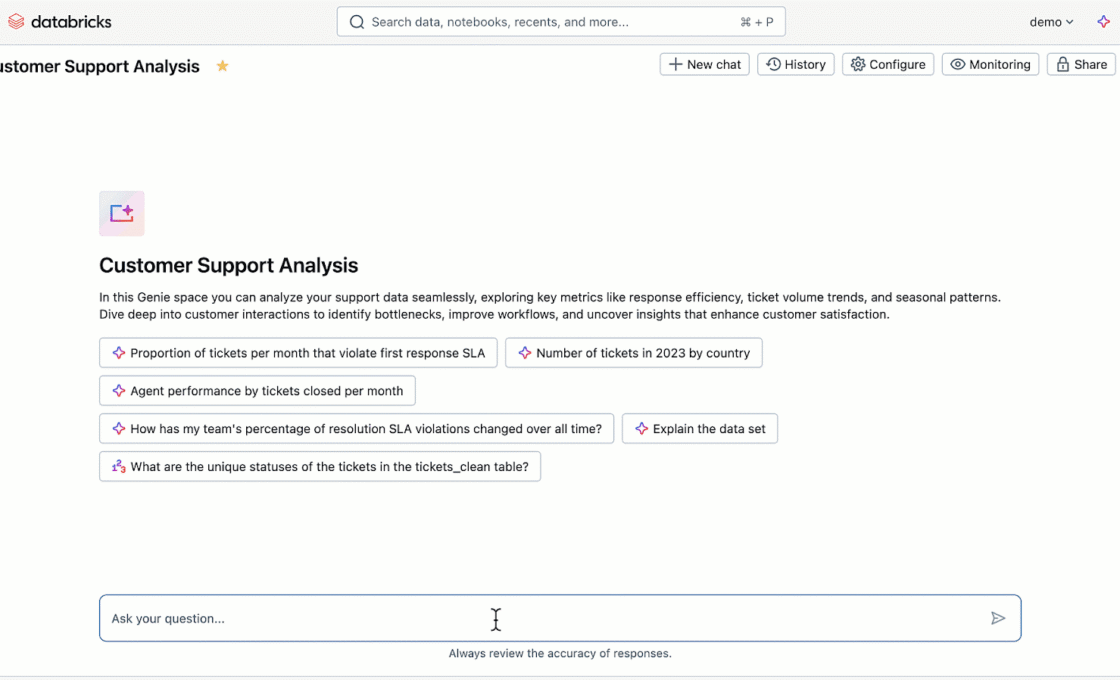
- Genie: A conversational, generative-AI interface where users can ask questions in natural language, get responses in visuals or SQL, dig deeper through follow-ups, get suggested visualizations, etc. It learns over time via usage and feedback.
- Built on top of Unity Catalog, which handles governance, lineage, permissions. This ensures that all dashboards or responses are trustable and auditable.
- Native integration with Databricks’ data platform (SQL warehouses, Photon engine, etc.), so enterprises don’t need to extract data elsewhere for BI. This improves freshness, lowers duplication and simplifies management.
Databricks Genie
AI/BI Genie uses a compound AI system rather than a single, monolithic AI model.
Matei Zaharia and Ali Ghodsi, two of the founders of Databricks, describe a compound AI system as one that “tackles AI tasks using multiple interacting components, including multiple calls to models, retrievers, or external tools.”
Use Cases: How Enterprises Are Using AI/BI
Here are some of the ways enterprises are applying it, or can apply it:
- Ad-hoc investigations of customer behaviour
Business users (marketing, product) can use Genie to ask questions like “Which customer cohorts churned in last quarter?” or “How did a campaign perform in region X vs Y?”, without waiting for engineers to build SQL pipelines. - Operational dashboards for teams
For operations, supply chain, finance etc., dashboards that update frequently, with interactive filtering, cross-visualization slicing, giving teams real-time monitoring. - Reducing the BI backlog and bottlenecks
When data teams are overwhelmed by requests for new dashboards, having tools that enable business users to do more themselves frees up engineering to focus on more strategic work (data pipelines, ML etc.). - Governance and compliance
Enterprises in regulated industries (finance, healthcare, etc.) need traceability: where data came from, who used it, what transformations it passed through. With Unity Catalog lineage + trusted assets in Databricks, AI/BI supports that. - Data democratization
Spreading data literacy: by lowering the barrier, a wider set of users can explore, ask questions, derive insights. This builds a data culture. - Integration with ML / AI workflows
Because it’s on Databricks, it’s easier to connect dashboards & conversational insights with predictive models, possibly bringing in forecasts, anomaly detection etc., or even embedding BI into AI‐powered apps.
Comparison
| Feature | Databricks AI/BI + Genie | Tableau Ask Data | Power BI (with Copilot / Q&A) |
|---|---|---|---|
| Parent Platform | Databricks Lakehouse (unified data, AI & BI) | Tableau / Salesforce ecosystem | Microsoft Fabric / Power Platform |
| Core Vision | Unify data, AI, and BI in one governed Lakehouse. BI happens where data lives. | Simplify visualization creation via natural language. | Infuse Copilot into all Microsoft tools — including BI — for everyday productivity. |
| AI Layer | Genie – a generative AI agent trained on enterprise data, governed by Unity Catalog. | Ask Data – NLP-based query translation for Tableau data sources. | Copilot / Q&A – GPT-powered natural language for Power BI datasets, integrated into Fabric. |
| Underlying Data Model | Databricks SQL Warehouse (Photon Engine) – operates directly on Lakehouse data (no extracts). | Extract-based (Hyper engine) or live connection to relational DBs. | Semantic Model / Tabular Dataset inside Power BI Service. |
| Governance | Strong – via Unity Catalog (data lineage, permissions, certified datasets). | Moderate – uses Tableau permissions and data source governance. | Strong – via Microsoft Purview + Fabric unified governance. |
| User Experience | Conversational (chat-style) + dashboard creation. Unified with AI/BI dashboards. | Type queries in Ask Data → generates visual. Embedded inside Tableau dashboards. | Ask natural language inside Power BI (Q&A) or use Copilot to auto-build visuals/reports. |
| Performance | Very high (Photon vectorized execution). Real-time queries on raw or curated data. | Depends on extract refresh or live connection. | Excellent on in-memory Tabular Models; limited by dataset size. |
| AI Customization | Uses enterprise metadata from Unity Catalog; can fine-tune prompts with context. | Limited NLP customization (no fine-tuning). | Some customization using “synonyms” and semantic model metadata. |
| Integration with ML/AI Models | Natively integrated (Lakehouse supports MLflow, feature store, LLMOps). | External ML integration (via Salesforce Einstein or Python). | Integrated via Microsoft Fabric + Azure ML. |
| Ideal User Persona | Enterprises already in Databricks ecosystem (data engineers, analysts, PMs, CXOs). | Business analysts and Tableau users who want easier visual exploration. | Office 365 / Azure enterprises seeking seamless Copilot-powered analytics. |
Conclusion
Databricks AI/BI is a powerful step forward in the evolution of enterprise analytics. It blends BI and AI so that enterprises can move faster, more securely, and more democratically with their data.
All three tools represent the evolution of Business Intelligence toward “AI-Native BI.” But here’s the philosophical difference:
- Tableau → still visualization-first, AI as a helper.
- Power BI → productivity-first, AI as a co-pilot.
- Databricks → data-first, AI as the core intelligence layer that unifies data, analytics, and governance.
For organizations that already use Databricks or are building a data lakehouse / unified analytics platform, AI/BI offers a way to deprecate some complex pipelines, reduce their BI backlog, bring more teams into analytics, while maintaining governance and performance.
References:
https://learn.microsoft.com/en-us/azure/databricks/genie
https://atlan.com/know/databricks/databricks-ai-bi-genie